What is NeuroRead Pro?
NeuroRead Pro is an intelligent, distraction-free reading and learning workstation engineered for anyone who reads to learn—students, researchers, software engineers, and lifelong bookworms.
At its core, NeuroRead Pro solves the single biggest problem with modern reading: cognitive drift. When you read traditional text on a screen or paper, your eyes frequently lose their place, internal sub-vocalizations wander, and notifications snap your attention.
Instead of treating reading and listening as two separate activities, NeuroRead Pro introduces Bimodal Reading: real-time synchronized visual word highlighting paired with ultra-natural neural speech synthesis. As each word is spoken, your eye is guided forward, completely anchoring your visual and auditory attention into a single unified flow state.
The Cognitive Science: Why Bimodal Reading Works
Why does pairing audio with moving visual text feel so effortless compared to traditional reading? Cognitive science explains this through two foundational principles:
Dual-Coding Theory (Paivio, 1986)
The human brain processes information through two separate cognitive channels:
- Visual channel: scans typography, formatting, layout, and word shapes.
- Auditory channel: decodes phonology, prosody, cadence, and vocal inflection.
When you only read visually, your auditory cortex is idle, leaving open bandwidth for mind-wandering. When you listen to an audiobook while cleaning, your visual cortex wanders. Bimodal reading saturates both channels simultaneously with the exact same data stream, effectively locking your attention into deep focus.
Elimination of Subconscious Eye Regression
Studies show that average readers spend up to 30% of their reading time on involuntary regressions—backward saccades where their eyes unconsciously dart backward to re-read words they just scanned. Synchronized text highlighting guides the eye forward like a pacing finger, preventing regression and instantly increasing reading speed from 200 WPM to 450+ WPM without losing comprehension.
4 Distinct Focus Modes in NeuroRead Pro
Every book and every reading session demands a different cognitive gear. NeuroRead Pro provides four purpose-built reading modes:
Reader Spotlight Mode
In Spotlight Mode, the active sentence or paragraph remains crisply illuminated while surrounding paragraphs gently dim. This creates a gentle spotlight effect that eliminates peripheral distractions, ideal for dense academic papers, legal contracts, and complex technical manuals.
RSVP Turbo Mode (Rapid Serial Visual Presentation)
Want to blast through a 300-page book in under two hours? RSVP Turbo streams words into a single focal point at customizable speeds (up to 900 WPM), eliminating the physical latency of saccadic eye movement. Paired with synchronized audio, you absorb non-fiction with zero eye fatigue.
Split-Read Mode
Designed for multilingual learners and parallel study, Split-Read allows you to view two synchronized panels side-by-side: original text on the left, and translations, notes, or chapter outlines on the right.
Pomodoro Focus Sprints
Built right into the reader toolbar, the Pomodoro widget runs 25-minute reading blocks followed by 5-minute active reflection intervals. Session logs track your word count, reading pace, and focus streaks over time.
Try reading with NeuroRead Pro's synchronized highlighting feature. It helps you stay focused by guiding your eyes and keeping you in the flow of the content.
Learn more about reading modes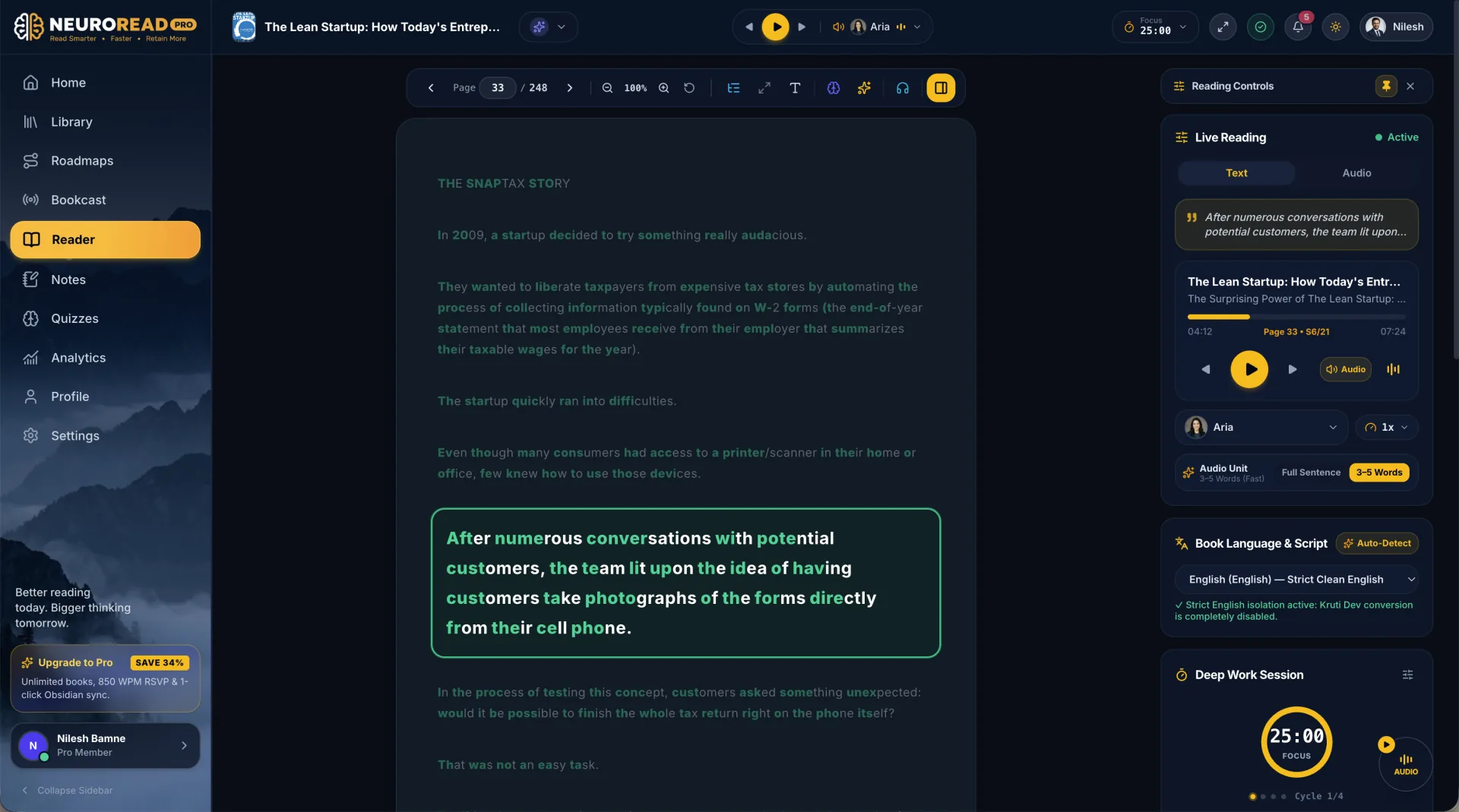
Introducing Luma: Your Personal In-Book AI Assistant
Reading is no longer a passive, one-way monologue. NeuroRead Pro features Luma, a specialized AI reading assistant living directly inside your reader sidebar.
When reading difficult material:
- Ask Luma instantly: Highlight any sentence or paragraph and click "Ask Luma". You can ask: "What does the author mean by this metaphor?" or "Can you provide a concrete real-world example?"
- Explain Like I'm 5 (ELI5): Instantly translate esoteric academic jargon into clear, intuitive everyday language.
- Auto-Generated Mindmaps: Luma automatically synthesizes key arguments of each chapter into clean conceptual hierarchies.
- Turn Chapters into AI Podcasts: Before diving into a 50-page chapter, ask Luma to produce a 6-minute, two-host conversational podcast episode summarizing the core thesis.
How to Get Started in 3 Simple Steps
Getting started with NeuroRead Pro takes less than 60 seconds:
- Import Your Books or Documents: Drag and drop any PDF, EPUB, MOBI, or markdown document. NeuroRead Pro automatically parses typography, strips out annoying headers and footers, and indexes the table of contents.
- Select Your Voice & Speed: Choose from 40+ ultra-realistic neural voices spanning multiple accents, genders, and reading styles. Dial in your preferred playback speed between 0.75x and 3.0x.
- Start Reading with Focus: Click play, lean back, and follow the highlighted words. Highlight passages, take marginalia notes, and quiz yourself with Luma's active recall cards.
Key Takeaways
- Bimodal reading synchronizes neural audio with visual text highlighting, engaging dual cognitive channels to double comprehension.
- NeuroRead Pro eliminates involuntary eye regressions, reducing reading fatigue and boosting comfortable reading speed.
- Purpose-built modes like Spotlight, RSVP Turbo, and Split-Read adapt to study, work, and leisurely reading.
- Luma AI turns every book into an interactive conversation with instant explanations, mindmaps, and 2-host audio podcast overviews.
- Completely private and distraction-free: no ads, no trackers, just pure reading flow.